Searching Across Combined Columns in Laravel: Getting Accurate Results
Learn how to search effectively by combining first and last name columns in Laravel, along with company names, for accurate results.
The Problem
When building search functionality in your application, you often need to search across multiple columns in your database tables. For example, you may want to search for employees based on their full names (a combination of first_name and last_name) or by the company they belong to. Implementing this in a clean, maintainable way can be challenging.
In this case, our goal is to search for employees by combining their first_name and last_name fields into a single search term, as well as by the name of the company they belong to. This requires careful handling of query logic to ensure accurate results.
Understanding the Model Structure
Before diving into the implementation, let's understand the basic structure of our models and their relationships:
- Company: This model represents a company and contains a single field,
name, which stores the name of the company. - Employee: This model represents an employee and contains two fields,
first_nameandlast_name, which store the employee's first and last names, respectively. Each employee belongs to a company, establishing a relationship between theEmployeeandCompanymodels.
The goal is to implement a search functionality that allows us to find employees based on their full names (a combination of first_name and last_name) or the name of the company they belong to.
The First Approach (and Why It Fails)
As a first thought, let's implement a custom query builder that splits the search terms and applies them individually:
<?php

namespace App\Post_05_better_performance_than_whereHas\IO\Database\Builders;

use Illuminate\Database\Eloquent\Builder;

class EmployeeBuilder extends Builder
{
    public function search(string $search): self
    {
        $terms = str_getcsv($search, ' ');

        collect($terms)->each(function ($term) {
            $searchTerm = '%' . trim($term) . '%';

            $this->where('first_name', 'like', $searchTerm)
                ->orWhere('last_name', 'like', $searchTerm)
                ->orWhereHas('company', function ($query) use ($searchTerm) {
                    $query->where('name', 'like', $searchTerm);
                });
        });

        return $this;
    }
}
What Goes Wrong?
When you search for "bill gates", the SQL looks like:
SELECT * FROM "employees"
WHERE "first_name" LIKE '%bill%'
   OR "last_name" LIKE '%bill%'
   OR EXISTS (SELECT * FROM "companies" WHERE "employees"."company_id" = "companies"."id" AND "name" LIKE '%bill%')
AND "first_name" LIKE '%gates%'
   OR "last_name" LIKE '%gates%'
   OR EXISTS (SELECT * FROM "companies" WHERE "employees"."company_id" = "companies"."id" AND "name" LIKE '%gates%')
LIMIT 15 OFFSET 0
Due to missing parentheses, it behaves like:
(bill matches)OR(gates matches)
Instead of:
(bill matches)AND(gates matches)
Result: You get irrelevant results like "Billy Smitham", "Billie Veum", etc.
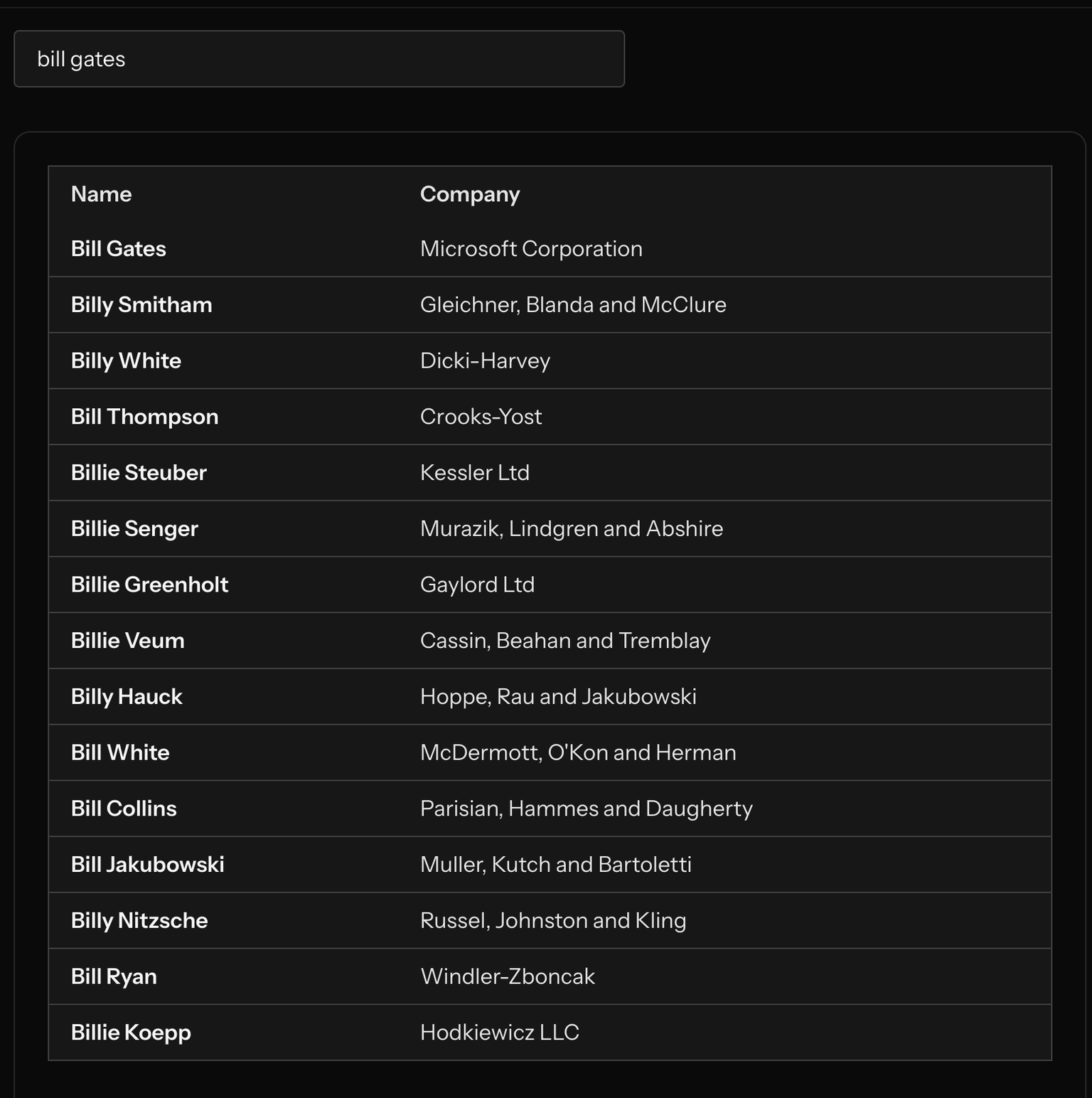
Explaining the Invalid Results
The invalid results occur because of how the query is structured. When searching for "bill gates," the SQL query generated by the invalid approach looks like this:
SELECT * FROM "employees"
WHERE "first_name" LIKE '%bill%'
   OR "last_name" LIKE '%bill%'
   OR EXISTS (SELECT * FROM "companies" WHERE "employees"."company_id" = "companies"."id" AND "name" LIKE '%bill%')
AND "first_name" LIKE '%gates%'
   OR "last_name" LIKE '%gates%'
   OR EXISTS (SELECT * FROM "companies" WHERE "employees"."company_id" = "companies"."id" AND "name" LIKE '%gates%')
LIMIT 15 OFFSET 0
This query does not group the conditions for each search term properly. As a result, the OR conditions for "bill" and "gates" are evaluated independently, leading to unexpected results. Specifically:
- The query matches any employee whose first name, last name, or company name contains "bill" OR any employee whose first name, last name, or company name contains "gates."
- This means that employees with "bill" in their name or company name are included, even if they have no connection to "gates," and vice versa.
Visualizing the Problem
To illustrate, searching for "bill gates" might return results like:
- Employees with first name "Bill" (e.g., Bill Smith)
- Employees with last name "Gates" (e.g., John Gates)
- Employees working at companies with "Bill" or "Gates" in their names
This happens because the query lacks proper grouping of conditions, causing the OR operators to take precedence over the AND operator. The intended behavior is to find employees who match both terms ("bill" and "gates") in any of the specified fields, but the actual behavior is to match employees who satisfy either term in any field.
The Correct Solution
To fix this, wrap each term's conditions in its own where closure. This ensures proper grouping and accurate results:
<?php

namespace App\Post_05_better_performance_than_whereHas\IO\Database\Builders;

use Illuminate\Database\Eloquent\Builder;

class EmployeeBuilder extends Builder
{
    public function search(string $search): self
    {
        $terms = str_getcsv($search, ' ');

        collect($terms)->each(function ($term) {
            $this->where(function ($query) use ($term) {
                $searchTerm = '%' . trim($term) . '%';

                $query->where('first_name', 'like', $searchTerm)
                    ->orWhere('last_name', 'like', $searchTerm)
                    ->orWhereHas('company', function ($query) use ($searchTerm) {
                        $query->where('name', 'like', $searchTerm);
                    });
            });
        });

        return $this;
    }
}
The Correct SQL Output
SELECT * FROM "employees"
WHERE (
    "first_name" LIKE '%bill%'
    OR "last_name" LIKE '%bill%'
    OR EXISTS (SELECT * FROM "companies" WHERE "employees"."company_id" = "companies"."id" AND "name" LIKE '%bill%')
)
AND (
    "first_name" LIKE '%gates%'
    OR "last_name" LIKE '%gates%'
    OR EXISTS (SELECT * FROM "companies" WHERE "employees"."company_id" = "companies"."id" AND "name" LIKE '%gates%')
)
LIMIT 15 OFFSET 0
Results
Now our search returns only Bill Gates from Microsoft Corporation, which is exactly what we wanted.
Bonus Tips for Performance
- Add indexes to
first_name,last_name, andcompany.name - Use
paginate()to limit results - Eager load relationships with
with('company') - Analyze queries using tools like Clockwork or Laravel Debugbar
Conclusion
When building multi-column search in Laravel, be careful with how you structure your query logic. Grouping conditions properly can be the difference between accurate results and noisy ones. Use closures inside where() to get the behavior you actually intend.